


Tired of the same old video calls where everyone just stares into the camera? If you’re looking for a free, simple, and hilarious way to liven up your next online get-together, it’s time to rediscover a classic. Remember frantically scribbling down answers for Scattergories, trying to think of a “vegetable that starts with W” before the timer buzzed? That same laugh-out-loud energy is the perfect cure for digital fatigue. To learn more, check out UFA100
Bringing that experience online is easier than you might think. You don’t need any special downloads or tech skills—if you can click a link, you can host the perfect virtual party. The beauty of online games scattergories is that the website handles the dice, the timer, and the lists for you. This frees you up to focus on the fun part: coming up with ridiculously creative answers.
More than just a word game, Scattergories is a catalyst for connection. Common experience shows that the real joy isn’t just scoring points, but in the friendly debates over whether “Watermelon” is a valid “weapon” or hearing the one answer so brilliant (or bizarre) that it leaves everyone in stitches. It’s a chance to play with friends in a way that feels genuinely interactive and memorable.
This guide will show you how to launch a game in minutes and explore fun variations that will make you the go-to host for unforgettable game nights, proving that you don’t need to be in the same room to share a great laugh.
The 60-Second Showdown: What Are the Basic Rules of Scattergories?
At its heart, Scattergories is a creative word category game that’s all about thinking fast. Forget complicated rules or a long setup. The entire game is a fun, frantic race against the clock where your main goal is to come up with answers no one else thinks of. The most hilarious moments come from the surprisingly creative (or hilariously wrong) answers that pop up when everyone is under pressure.
Learning how to play Scattergories virtually takes less than a minute. Each round follows the same simple steps:
- Get Your Letter & List: The game gives everyone the same random letter (like B) and a list of 10-12 categories (like “A Boy’s Name” or “Things Found in a Park”).
- Start the Timer: A timer begins, usually for 60 to 90 seconds. The countdown is on!
- Write Your Answers: You have to write down an answer for each category that starts with the chosen letter. For “B,” you might write “Ben” and “Bench.”
The secret to winning isn’t just about filling in the blanks—it’s about being unique. After the timer runs out, everyone shares their answers. If you wrote down an answer that no one else did, you get a point. If someone else has the same answer, you both get zero for that category. This simple rule is what makes the game so challenging and rewarding. It pushes you to dig deeper than the obvious answer, leading to the laughter and friendly debates that make Scattergories a classic.
Where to Play Instantly: The 2 Best Free Scattergories Websites
Now that you know the rules, you’re probably wondering where you can play Scattergories online with friends. The great news is that you don’t need to download an app or pay for a subscription. Several fantastic, free websites are dedicated to the game, handling the lists, letter-rolling, and timer for you so you can focus on the fun. Getting a game started is often as simple as visiting a webpage.
For a no-fuss, classic experience, the most popular choice is a site called SwellDone. Many players love it because it’s incredibly straightforward and requires no account or signup. You simply land on the page, click a button to create a new game, and you’re ready to go. Its clean, minimal design puts the focus squarely on the game itself, making it a perfect pick if you want to play a free word category game for groups without any distractions.
If you’re looking for a slightly more modern interface with a few extra bells and whistles, another excellent option is StopotS. While it works on the same basic principle—create a game and invite friends for free—it has a more colorful, polished look. The choice between them really just comes down to personal preference: do you want the simple, classic version (SwellDone) or a more vibrant one (StopotS)?
Regardless of which site you choose, inviting your friends follows the same easy pattern. After creating a game, the website will generate a unique private link. This is your digital key to the game lobby, the virtual waiting room where everyone gathers. All you have to do is copy that link and paste it into your group chat, text message, or email. Anyone who clicks it will instantly join your game.
A step-by-step guide to creating a game room, inviting friends via a link, and starting the first round
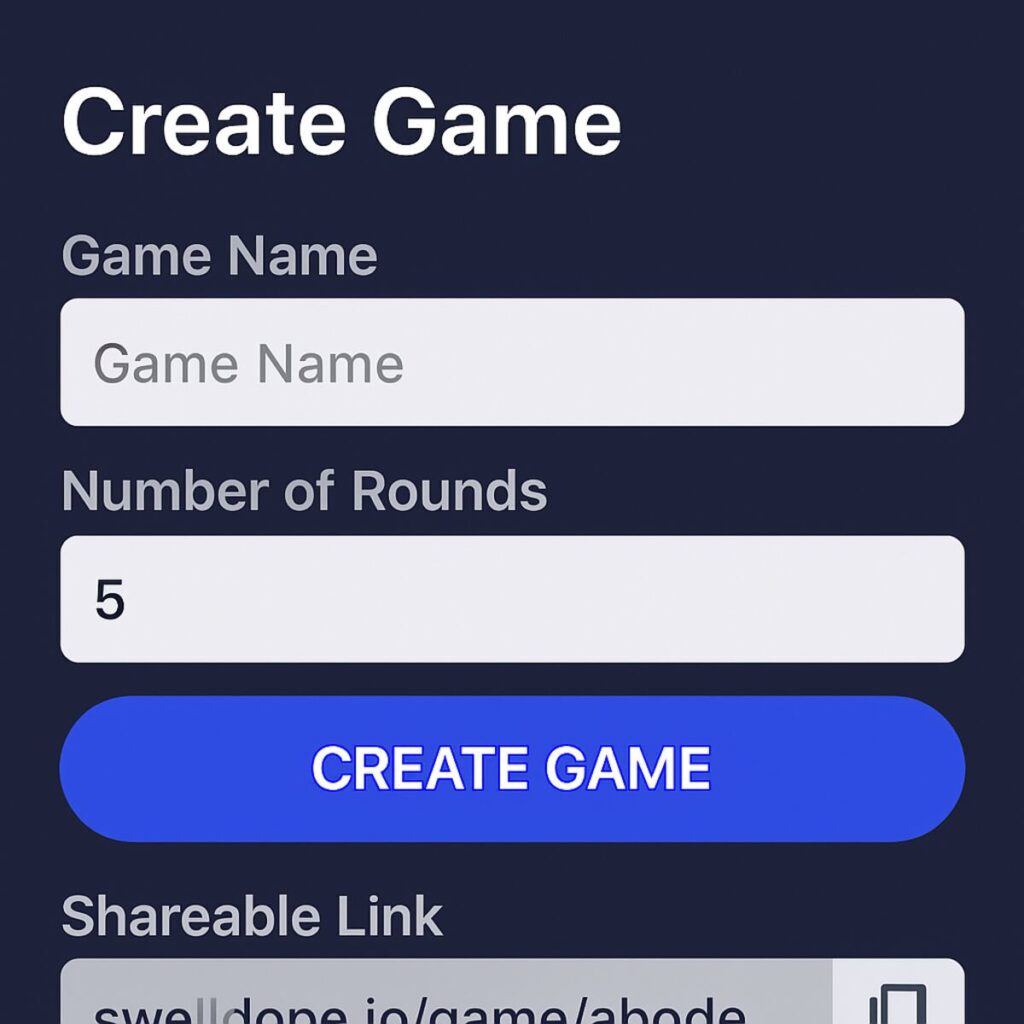
Ready to host your own digital Scattergories night? It’s far easier than you might think and takes less than a minute. Using a simple site like SwellDone, you can have a private game room up and running in just a few clicks. Follow these exact steps to get started:
- Navigate to the website (like SwellDone.com).
- Click the prominent button labeled “Create Game.”
- The page will refresh and instantly provide a unique game link. Click the “Copy” button.
- Paste this link directly into your group chat (WhatsApp, Messenger, text message, etc.) to invite friends.
Once you share that link, your job as host is mostly done. As your friends click the link, you will see their names pop up in the game lobby—no downloads, sign-ups, or complicated codes required. This simple copy-and-paste method is perfect for getting everyone on the same page quickly, whether you’re organizing a family game night or looking for a fun break with your virtual team on Zoom. It’s the digital equivalent of everyone arriving and taking a seat at the table.
When all your players have joined the lobby, the person who created the game (that’s you!) will see a “Start Game” button. Clicking this begins the first round for everyone simultaneously. The timer will kick off, the first letter will be revealed, and the frantic fun begins!
The Art of Scoring: How to Count Points and Win Bragging Rights
When the timer runs out, the real fun begins: comparing answers. The rules for playing Scattergories online are beautifully simple. You go through each category, one by one, and share what you wrote down. If your answer is unique—meaning no one else in the game wrote the same thing—you get one point. However, if your answer matches another player’s, you both cross it out and get zero points for that category. The goal isn’t just to be correct; it’s to be creative enough that your answer stands alone.
This is where the hilarious debates often start. What if the letter is ‘P’, the category is ‘Things Found in a Park,’ and someone wrote “Peace and quiet”? Does that count? Most online versions of the game let your group vote on whether an answer is acceptable. This moment of friendly argument is a core part of the experience. It rewards clever thinking and ensures everyone gets a say in what flies. There’s no strict rulebook here—it’s all about group consensus.
Ultimately, the best part of this online word game is that your group is the judge. You can decide on your own “house rules” before you even start. Maybe you’ll allow two-word answers if the first word starts with the round’s letter, or maybe you’ll give bonus points for alliteration. This flexibility makes every game feel fresh and tailored to your friends’ sense of humor. This same spirit of player control is essential if you decide to run a game yourself.
No Website? No Problem: How to Play Scattergories on Any Video Call
Taking that spirit of player control to the next level is surprisingly simple. You don’t need a fancy, dedicated website to play; you can host a fantastic game of virtual Scattergories with tools you already use. This DIY method works perfectly on any video call platform and gives you complete freedom over the game.
You only need a few simple things to get a game running:
- A video call with your friends or family (Zoom, Google Meet, etc.).
- One person to volunteer as the “host.”
- A free online letter generator to pick a random letter.
- A free online Scattergories category list.
- A pen and paper for everyone playing.
The host acts as the master of ceremonies. Their job is to find a category list online, share their screen so everyone can see it, and then use a separate tool to generate a random letter for the round. Once the letter is announced, the host starts a one-minute timer (using their phone is perfect for this). When time is up, everyone stops writing, and you go around the group sharing answers, just like in the classic board game.
The beauty of this approach is its flexibility. You can find classic lists, funny lists, or even themed lists for holidays, making it a great way to liven up any virtual get-together. The rules for playing Scattergories on a call are entirely up to you and your group, ensuring the focus stays on creativity and laughter.
Your Ultimate Toolkit for DIY Scattergories
To host your own game, you just need a few digital tools. The best part is that all these tools are free, browser-based, and incredibly simple to use. Bookmark this page, and you’ll be ready to launch a game night in under a minute, anytime the mood strikes.
Getting your game started is as easy as opening three tabs in your browser. Here are the essential, no-fuss tools you’ll need to run the show:
- The Letter Picker: Instead of shaking a 20-sided die, use a simple scattergories letter generator tool. With one click, it gives you a random letter for the round. Its only job is to provide the letter, and it does it perfectly.
- The Category Lists: This is where you’ll find the heart of the game. A dedicated scattergories list generator online gives you access to hundreds of classic and creative lists, ensuring you never run out of fun challenges.
- The Timer: While a phone works, using an online timer that you can share on your screen ensures everyone sees the same countdown. It adds to the shared excitement and friendly pressure of the game.
With these three links, you are officially equipped to run a fantastic game of Scattergories on any video call. But the standard lists are just the beginning. The real fun of the DIY method comes from finding prompts that perfectly match your group’s sense of humor.
Beyond the Standard Lists: Where to Find Hilarious and Creative Categories
While the classic categories are a great starting point, the real magic of DIY Scattergories happens when you tailor the game to your specific group. Moving beyond “Types of Fruit” is what creates those unforgettable, laugh-until-you-cry moments. Fortunately, the internet is a treasure trove of creative prompts that can instantly refresh the game for everyone, serving as fantastic scattergories online alternatives to the standard fare.
Finding these creative prompts is easier than you might think. A simple web search for phrases like “funny Scattergories lists for adults” or “holiday Scattergories ideas” will unlock countless options on blogs and sites like Pinterest. These resources are made by fellow game lovers and often contain dozens of unique lists you can screenshot or copy for your own game night, from TV show themes to seasonal challenges.
The right theme can instantly transform the game’s energy. Imagine playing a “90s Nostalgia” list with your childhood friends, or a “Family Inside Jokes” list during a virtual reunion. Categories like “Bad First Date Ideas,” “Things You Find in a Junk Drawer,” or “Reasons to Fake an Emergency” are guaranteed to produce far more surprising and hilarious answers than the standard set, giving you a chance to create your own custom scattergories categories on the fly.
After you’ve played a few of these unique rounds, you’ll see just how much a great list can guide the fun. This often sparks an even bigger idea: what if you could design a list perfectly suited for your friends, family, or coworkers? Once you’re ready to take full control of the game night, it’s time to become the ultimate host.
Become a Game Master: How to Create Your Own Custom Lists
Designing your own categories is the ultimate way to make this multiplayer word game for a virtual party feel truly personal. Stepping into the role of a custom scattergories categories creator lets you craft an experience perfectly tailored to your group, whether it’s for a family reunion or a fun session of virtual scattergories for Zoom teams. The goal is to build a list that taps into your shared history and inside jokes, guaranteeing that every answer sparks a conversation or a laugh.
A great custom list is all about balance. You want a mix of categories that are easy enough for everyone to get a point or two, plus a few challenging ones that reward creative thinking. For a list that everyone will love, start with these simple tips:
- Brainstorm your group’s inside jokes. Think about funny memories, shared experiences, or silly phrases that only your friends would know.
- Pick a theme everyone loves. Center your list around a favorite TV show, a shared hobby, a decade you all grew up in, or even a recent company project.
- Balance the difficulty. For every tough category like “Things from a Sci-Fi Movie,” add an easier one like “Things You Eat for Breakfast.”
- Keep it clear and simple. Category names should be short and easy to understand so no one wastes precious time trying to figure out the prompt.
With a personalized list in hand, the game transforms from a simple party game into a celebration of your group’s unique connection. You’ve set the stage for an unforgettable round, and now the only thing left is to decide how you’ll handle those wonderfully debatable answers. The key? Establishing a few “house rules” before you begin.
Spice It Up: 3 Game-Changing “House Rules” to Try Tonight
Once the standard rules feel like second nature, it’s time to make the game your own. “House rules” are simply fun, custom agreements your group makes before playing to add a new layer of strategy or silliness. These creative variations of Scattergories are perfect for handling the wonderfully weird answers that come from funny Scattergories lists and ensure the game never gets stale. The goal isn’t to make things more complicated, but to add more opportunities for laughter.
A popular favorite is the Alliteration Bonus. With this rule, players get an extra point for every word in their answer that starts with the chosen letter. For a round with the letter ‘P’ and the category “A Famous Person,” an answer like “Post Malone” would still earn one point. However, a clever answer like “Peter Parker” would snag two points! This simple change encourages players to dig deeper than the first answer that comes to mind, rewarding creativity.
Beyond scoring tweaks, you can change the entire game with Themed Rounds. Before starting, your group might declare a theme like “80s Night” or “Only things found in an office.” Now, every answer must not only start with the correct letter but also fit the theme, adding a fun and sometimes tricky constraint. Another easy rule is simply agreeing to award points for answers that are technically wrong but hilariously right, letting the group’s vote decide what counts.
Ultimately, the best house rules are the ones you invent together. These are just starting points to spark your imagination. Maybe you’ll decide that rhyming answers get a bonus, or that you can “steal” a point if you think of an answer for someone else’s blank space. While these rules work on any platform, if you’re looking for Scattergories online alternatives for your phone, you’ll find some apps have these features built right in.
What Are the Best Scattergories Apps for Your Phone or Tablet?
While websites are perfect for a planned game night, sometimes you just want to play a quick round on your phone. If you search for what are the best Scattergories apps, you’ll immediately find the official Scattergories app by Magmic Inc. It’s a polished and popular choice that puts the classic word game right in your pocket, making it easy to play from anywhere, whether you’re on your lunch break or waiting in line. It’s designed specifically for mobile devices, offering a different kind of experience than the web-based versions.
The biggest difference with a mobile app is that you often play on your own time. Instead of everyone joining a live game room, you take your turn, and then the app notifies your friend that it’s their turn. This makes it a fantastic multiplayer word game for challenging one or two friends who have busy schedules. However, this turn-based style means it’s less suited for recreating the loud, chaotic fun of a live party where everyone is reacting and laughing at the same time.
Another great feature of the app is the ability to play by yourself against the clock or take on automated challenges. It’s a fun free word category game to keep your brain sharp and get practice for the next group showdown. While these apps are fantastic for solo play or a casual back-and-forth with a friend, they can be tricky to coordinate for a big group event.
Your Turn to Host: A Quick-Start Plan for Your Next Game Night
You now have everything needed to host a digital Scattergories night, from understanding the rules to gathering your friends for a round of creative, fast-paced fun.
Here is your simple game night checklist:
- Choose your method: Decide between an easy-to-use website or the flexible DIY route.
- Pick your lists: Stick with classic categories or find some creative new ones.
- Send the invite: Share the game link and this guide to get everyone started!
The best part isn’t just winning—it’s coming up with the most creative answer and having a great laugh when you play Scattergories online with friends. It’s about connection, not just points. So, who are you inviting to play first? Send that text, share that link, and get ready for a memorable game night.